Home › Reviews › ActiveCampaign Review
EMAIL MARKETING REVIEW

ActiveCampaign Review 2026

Hands-on tested
Route leads by what they ask for, then see which path they took.
Choose ActiveCampaign Plus when inquiries need different follow-ups based on the form response. If the workflow also creates deals, price Enhanced CRM before you commit.
8.1/10
Strong
Based on our testing & research
14-Day Free Trial
No Card Required
Plus $49/mo billed yearly
Affiliate-supported — We may earn a commission from qualifying links. Our reviews remain editorially independent.
Hands-on test
24 November 2026
Tested by
GuidedVault

Quick Snapshot

Best For
Small Marketing Teams
Lead routing and sales follow-up
Routing Plan
Plus · $49/mo
USD at 1,000 contacts, billed yearly
Cost Structure
Subscription
Stored contacts and add-ons
Core Offering
Email & Automation
Forms, branching and optional CRM
Access
14-Day Trial
Browser-based, no card required
Ease of Use
Moderate
Setup grows with the workflow

Pros, Cons & How We Tested

Pros

  • Route form leads to different follow-ups.
  • See the path a specific contact took.
  • Create a deal on an existing contact with a qualification tag.

Cons

  • Starter omits Branch and caps automations at five actions.
  • Automated deal creation requires an Enhanced CRM add-on on paid plans.
  • New accounts count stored opt-outs toward the contact limit.

How We Tested

On 24 November 2026, we used the 14-day trial, which ActiveCampaign describes as Professional-equivalent with CRM add-on access for evaluation. We used synthetic data for routing, imports and the deal, and one owned inbox for the send. Trial capabilities · Our research process
  • Three hosted-form routes and one repeat submission
  • Separate active and unsubscribed CSV imports
  • One tag-triggered CRM deal
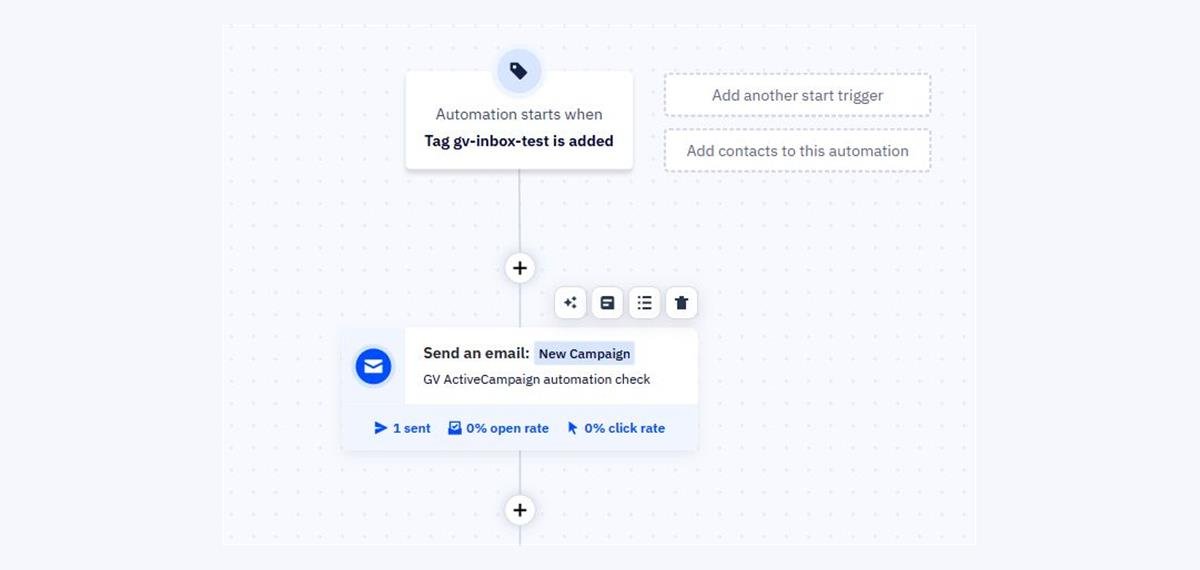
  • One automation email to Gmail

Review Findings

HANDS-ON · FINDING 01

Form submissions took the right path

WHAT WE CHECKED
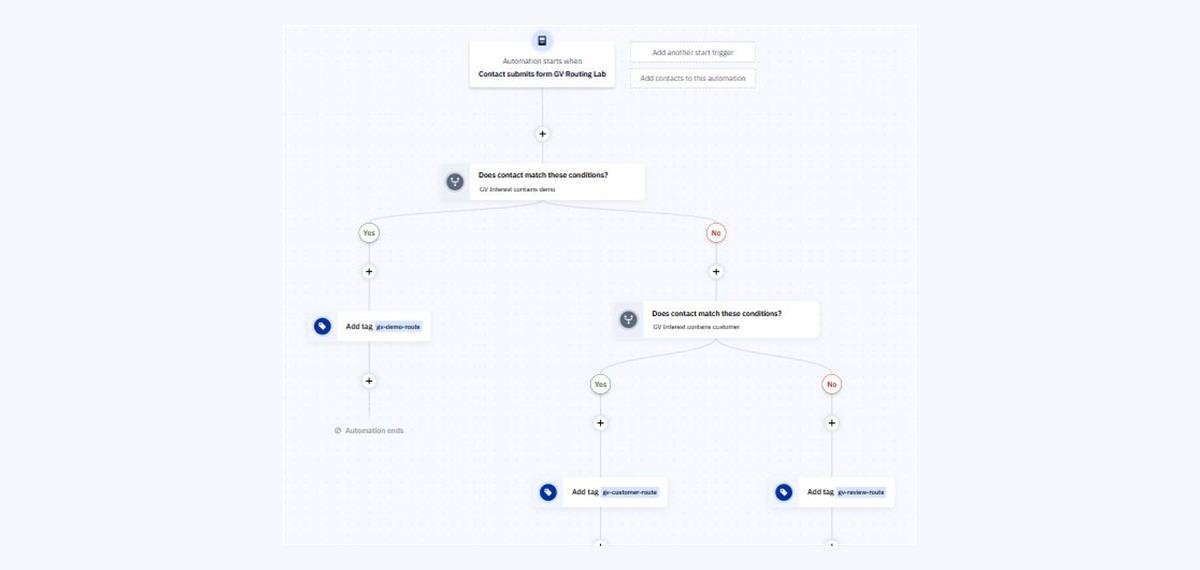
We submitted “demo customer,” “customer” and “browse” through a hosted form with a custom Interest field. The trigger was set to run once per contact.
WHAT WE FOUND
Multi-branch offered equality checks for this field, so we used two If/Else checks with “contains.” Demo took priority when both words matched. All three contacts received the intake tag and exactly one route tag. The identical Demo resubmission left one completed run, and the run history showed the route and tag action. See the tested paths.
LIMITATION
The routing test ran on the Professional-equivalent trial. Check that Plus supports the same field and operator in your account.
VERDICT
Check Plus first for field-based routing. Try the exact field and match operator your form needs. Set the trigger to run once if a returning contact should stay out of this workflow. Branch availability · Run history
HANDS-ON · FINDING 02

The import skipped a duplicate and recorded an opt-out

WHAT WE CHECKED
We imported two active rows with the same email address. For the separate opt-out CSV, we selected the test list and chose Import as Unsubscribed Contact. Existing-contact updates, automations and webhooks were off.
WHAT WE FOUND
The first record stayed Active with its original name. The report counted one success and one failure and said the existing contact details were unchanged. The separately imported record appeared as Unsubscribed.
LIMITATION
This sampled field mapping, one duplicate and one list opt-out. Bulk throughput, cross-list suppression and integration migrations remain untested.
VERDICT
Separate active records and opt-outs before import. Check both statuses on a scratch list before moving the full audience. Count stored opt-outs when budgeting for a new account. CSV import guide · Contact counting rules
HANDS-ON · FINDING 03

A qualification tag created a linked deal

WHAT WE CHECKED
We applied a qualification tag to one existing synthetic contact and let the Add a deal action run once.
WHAT WE FOUND
ActiveCampaign created one linked USD 100 deal in To Contact and assigned it to the trial admin. We could open the deal directly from the contact record.
LIMITATION
We used one pipeline and one owner. Owner rotation, forecasting and two-way CRM sync remain untested.
VERDICT
Include Enhanced CRM in the quote if sales needs an automatically created deal. ActiveCampaign lists Add a deal under Enhanced CRM on Plus and higher. CRM add-on eligibility
HANDS-ON · FINDING 04

One automation email reached Gmail

WHAT WE CHECKED
We set a tag-triggered automation to run once, then added its tag to one active test contact.
WHAT WE FOUND
Domain authentication and a saved mailing address cleared the send block. The test email reached Gmail’s Promotions tab.
LIMITATION
One message to one Gmail inbox verifies receipt for this workflow. Delivery at campaign scale and placement across inbox providers remain untested.
VERDICT
Complete sender setup early and verify receipt in a real inbox before switching on your production workflow. Sending-domain setup

GuidedVault Scorecard

Five equally weighted scores reflect a small team choosing automation for lead follow-up. Email scoring covers setup and the verified test send.
EASE OF USE
7.5
/10

The routing canvas was clear. Sending setup spanned domain authentication and mailing-address settings.

LEAD ROUTING
9.0
/10

All three contacts took the intended path. The repeat submission left one completed run.

EMAIL SETUP & SENDING
8.0
/10

One recorded send reached Gmail Promotions after setup.

SALES CRM
8.5
/10

One linked deal was created at the expected stage and owner.

VALUE FOR MONEY
7.5
/10

Plus is a sensible starting point for routing. Stored contact count and CRM add-ons can raise the total.

OVERALL SCORE
8.1
/10
Strong
Strong for teams with repeatable lead routing and follow-up.

Features & integrations

These capabilities and requirements come from ActiveCampaign’s documentation.

Segmentation

Check the exact conditions you need. ActiveCampaign documents limited segmentation on Starter and expanded segmentation on higher tiers.

Saved segments · Plan guide

Campaigns, SMS and transactional email

For a newsletter, use a standard campaign and start with a template in the Email Designer. Our send tested an automation email. Check newsletter editing in the trial if it is a buying priority. Price SMS and transactional email separately. Campaign setup

Add-on eligibility

Import and integrations

CSV imports map contact fields. Shopify can supply purchase and abandoned-cart data for automation. Check historical sync before planning a migration around an integration.

CSV import · Shopify integration

Pricing & Plans

USD public rates checked 24 November 2026. The cards show monthly equivalents billed yearly for 1,000 contacts. Annual totals are calculated from those rates before tax or extras. Month-to-month rates remain unverified. Public pricing · Plan guide

Starter

For short email sequences
$15
/ month
$180/year at 1,000 contacts
INCLUDES
  • One included user seat
  • 10,000 monthly sends at 1,000 contacts
  • Five actions per automation
  • Up to 25,000 contacts
  • Campaigns, forms and simple sequences
KEY DIFFERENCE
Up to five actions per automation. Field-based Branch starts on Plus.

Plus

For branching and lead follow-up
$49
/ month
$588/year at 1,000 contacts
INCLUDES
  • One included user seat
  • 10,000 monthly sends at 1,000 contacts
  • Branch and expanded automation actions
  • Landing pages and basic segmentation
  • Eligible for Enhanced CRM
KEY DIFFERENCE
The first tier to check for routing. Price Enhanced CRM separately if you need deals.

Pro

For advanced email and targeting
$79
/ month
$948/year at 1,000 contacts
INCLUDES
  • Three included user seats
  • 12,000 monthly sends at 1,000 contacts
  • Advanced segmentation and reporting
  • Predictive sending and conditional content
  • Advanced automation actions
KEY DIFFERENCE
Adds advanced segmentation, predictive sending and conditional email content.

Billing & Extras

Costs beyond the headline plan price
ENHANCED CRM
Separate quote on Plus and up
5,000 CONTACTS
Starter $79 · Plus $145 · Pro $205 per month, billed yearly
INCLUDED SEATS
Starter 1 · Plus 1 · Pro 3
TRIAL
14 days, no card required
WATCH FOR
For accounts created from 3 November 2025, ActiveCampaign counts unsubscribed, unconfirmed and bounced records toward the contact limit. Budget from your stored contact count. If your team needs extra seats or CRM, ask for the combined quote. Contact counting rules

Trial access. The card-free trial lasts 14 days. ActiveCampaign’s guide lists up to 100 email sends and includes access to CRM tools for evaluation. Trial capabilities

GUIDEDVAULT TAKE

Which plan makes sense?

Choose the lowest plan that supports the hardest step in your workflow. For conditional routing, check Plus first. Choose Pro when a specific advanced capability earns the price difference.
  • Starter works for a short sequence that fits five actions.
  • Plus supports Branch, including the If/Else action used in our workflow.
  • Pro makes sense when conditional content, predictive sending or advanced segmentation will get used.
  • Check Enterprise if you need SSO or premium CRM integrations.
  • For automated deal creation, quote the base plan and Enhanced CRM together.

Who ActiveCampaign Is Best For

Choose based on how often your team routes, investigates and follows up with leads.
STRONGEST FIT

Best For

  • Teams routing form leads by intent
  • Operators who need to trace a contact’s automation path
  • Teams that qualify leads before a sales handoff
LOOK ELSEWHERE IF

Not Ideal For

  • You mainly send newsletters or need a permanent free email plan
  • You need branching at the entry-tier price
  • Your budget assumes only active subscribers count
OTHER OPTIONS

Top Alternatives

MailerLite

Start with a newsletter, hosted signup and a welcome series.

Why MailerLite?

Compare MailerLite if building a subscriber list and sending newsletters is the main job. Check its automation tier if the workflow grows beyond a welcome series. Our MailerLite review

Mailchimp

Compare campaign tools when the newsletter is the priority.

Why Mailchimp?

Mailchimp is worth comparing if the decision hinges on campaign design and audience management. Check which automation steps your plan includes. Mailchimp plan guide

HubSpot

Make deal tracking and follow-up the priority.

Why HubSpot?

Compare HubSpot if pipelines, tasks and rep follow-up come first. Price marketing sends alongside the CRM if you want to use it for both. HubSpot CRM

FREQUENTLY ASKED QUESTIONS

What to know before you choose a plan
Is there an ongoing free plan?

ActiveCampaign offers a card-free 14-day trial. We found no ongoing free Email plan on the pricing page. Plan pricing

Can I build these branches on Starter?

ActiveCampaign lists Branch, including If/Else, from Plus. Starter supports simpler flows with a five-action limit. Action availability

What did the test email require?

On our trial, the email sent after we authenticated the sending domain and saved a mailing address. It reached Gmail Promotions. Domain setup

Do I need the CRM add-on to create deals automatically?

The trial allowed automated deal creation. On paid Email plans, ActiveCampaign lists Add a deal under Enhanced CRM on eligible Plus, Pro and Enterprise plans. CRM add-on eligibility

FINAL VERDICT

GUIDEDVAULT VERDICT

Worth pricing when leads need different follow-up

Choose Plus for branching and price Enhanced CRM if a route needs to create a deal. For a hosted signup page, newsletter and short welcome series, compare MailerLite first.
Best for small marketing teams with repeatable lead-routing rules.
8.1 / 10
Strong
Confirm your required actions, contact tier and CRM quote before buying.