
Mailchimp Review
Hands-on tested
Quick Snapshot
Pros, Cons & How We Tested
Pros
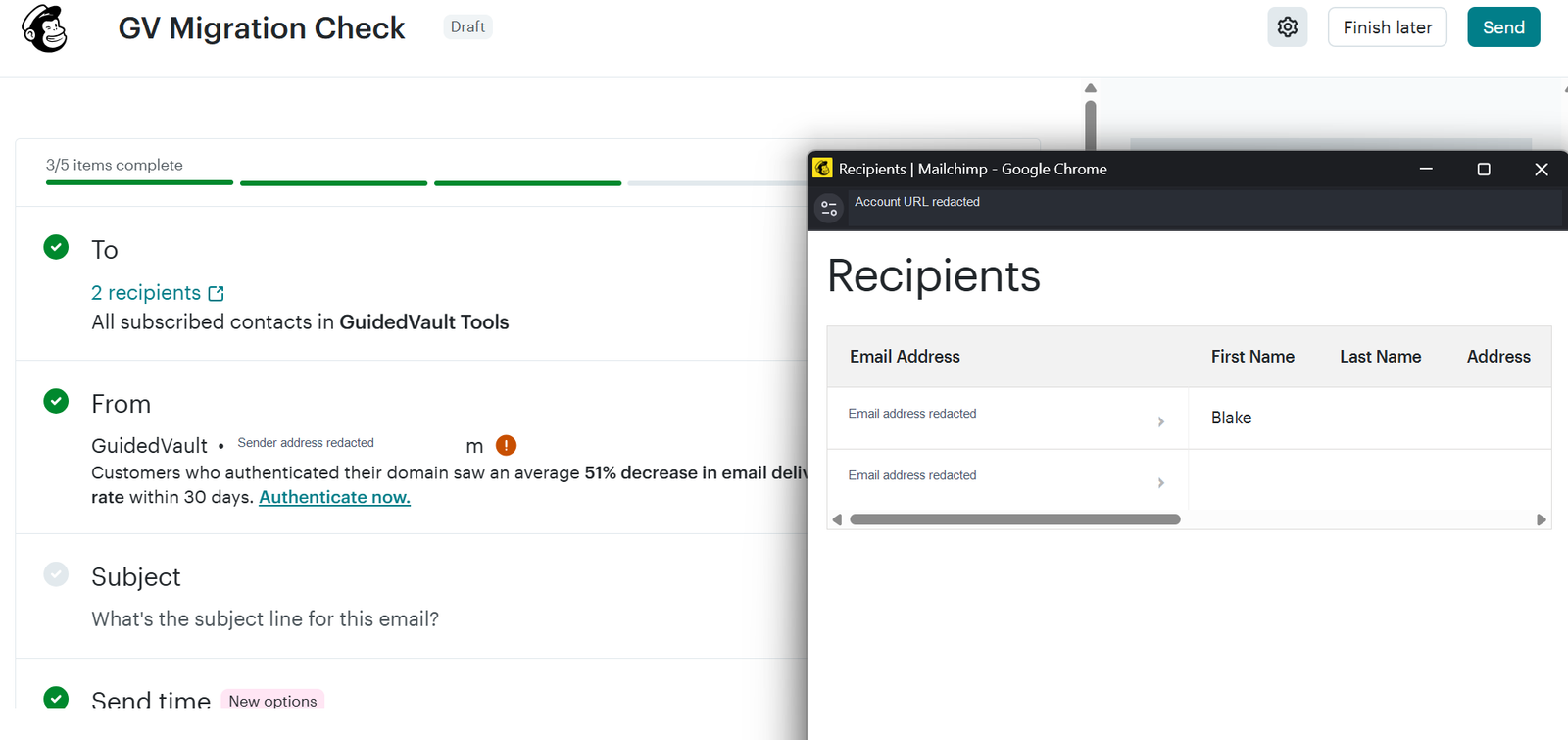
- Open the actual recipient list before sending. Our two intended contacts were listed by address.
- Tags let one contact belong to more than one interest group within an audience.
- Shopify and WooCommerce integrations can sync customer and order data. Shopify · WooCommerce
Cons
- Free covers 250 counted contacts and 500 sends a month, subject to 250 sends per day.
- Importing a mapped blank field with existing-contact updates enabled can erase saved values.
- Go to Essentials for short automation flows or Standard for branching. Automation plan limits
How We Tested
- Imported subscribed contacts and checked tag assignments
- Inspected an existing contact after a CSV update with a blank name field
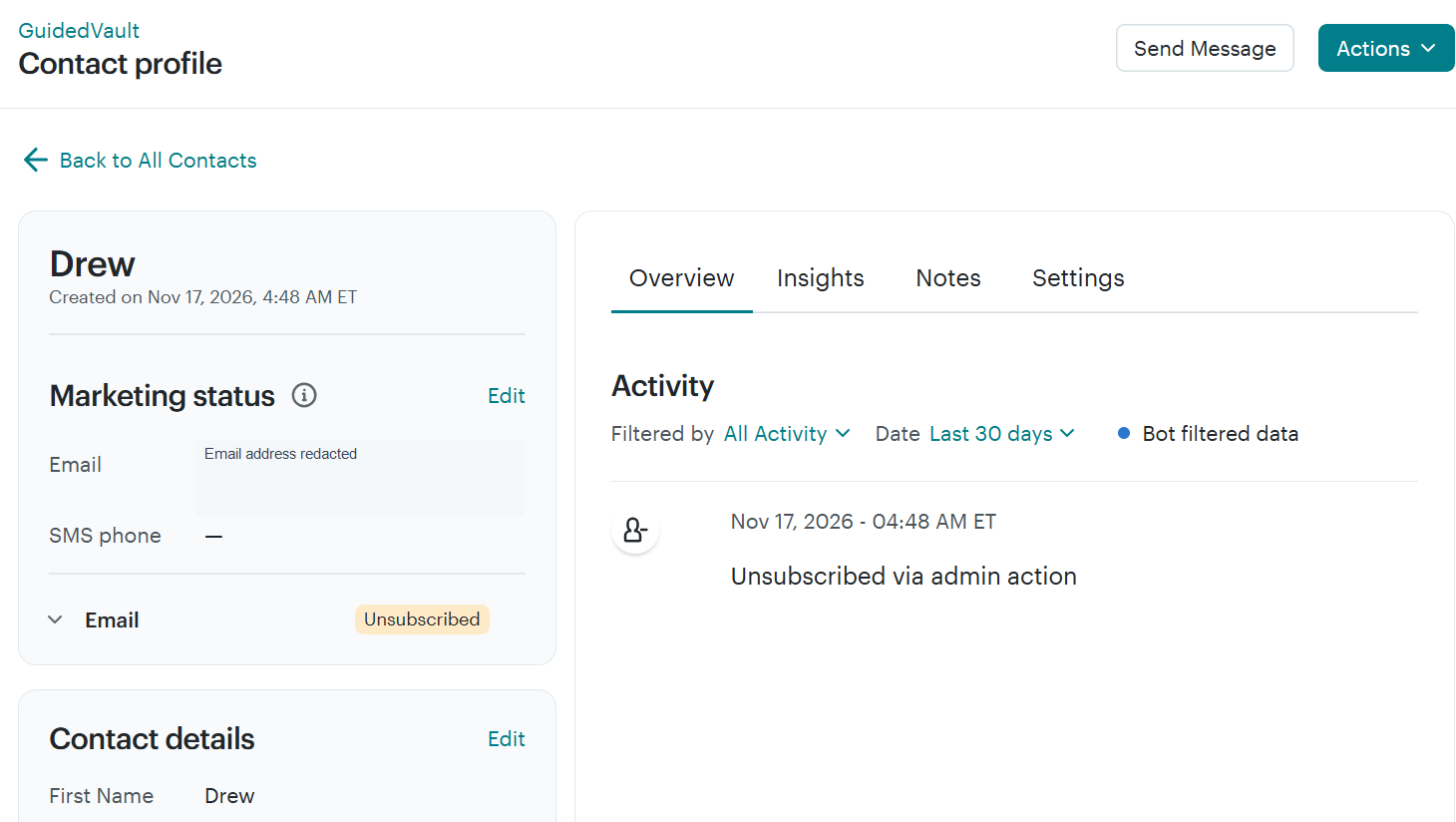
- Checked the opt-out contact’s marketing status
- Opened the draft’s actual recipient list and checked which addresses appeared
Review Findings
Mapped blanks put existing contact data at risk
Tags narrowed the draft to the intended addresses
GuidedVault Scorecard
Tags survived our small import. Mapped blank fields need care when updating contacts.
We saw the opted-out record and inspected the two selected recipients individually.
An address-level preview makes it possible to spot an unintended subscriber before a tagged campaign goes out.
Mailchimp documents Shopify and WooCommerce sync and branching on Standard.
Free fits occasional sends. Essentials adds capacity for regular campaigns.
Features & integrations
Based on Mailchimp’s product documentation.
Audience tags and segments
Tags can record overlapping interests within one audience. Use segments to select contacts who match campaign rules.
Build, schedule and measure a campaign
Build a regular campaign in the email editor and choose a segment or tag for the send. Mailchimp Free includes basic reporting. With tracking enabled, a campaign report lets you inspect clicks, bounces and unsubscribes. Essentials adds scheduled sending and A/B tests if you want to compare subject lines. For a newsletter asking readers to take action, use tracked clicks and filter bot activity when reviewing results.
Marketing automation flows
Use Essentials for a short flow such as a welcome email after signup. It allows up to four steps. If you need to send different follow-ups based on conditions such as a contact’s tag, Standard adds conditional branches and allows up to 200 steps.
Store integrations and abandoned-cart follow-up
Connect a supported Shopify or WooCommerce store before relying on cart events. Mailchimp documents a flow that starts when a shopper leaves a cart and can send a reminder after a delay. Budget for a paid automation plan and confirm the cart trigger is available for your store and tier. If you need conditional paths, budget for Standard or higher. We reviewed the integration and flow documentation.
Pricing & Plans
Free
- 250 counted contacts
- 500 sends per month
- 250 sends per day
- 1 audience and 1 seat
- Basic reporting
Essentials
- 5,000 monthly sends at 500 contacts
- 3 audiences and 3 seats
- Email scheduling
- Automations with up to 4 steps
- A/B testing
Standard
- 6,000 monthly sends at 500 contacts
- 5 audiences and 5 seats
- Up to 200 steps per automation
- Conditional branches
- Advanced segmentation
Premium & Billing
Published USD rates vary by contact tier. Mailchimp plan guide.
Which plan makes sense?
- Free fits occasional sends, or up to 125 recipients per issue over four issues when you have no other sends.
- Essentials starts at US$13/month for up to 500 counted contacts and 5,000 monthly sends. That covers the 800-send newsletter example with room for 4,200 more campaign or automation sends, assuming no other sends.
- Standard starts at US$20/month for up to 500 counted contacts and 6,000 monthly sends. Pay for it when you need branching, advanced segments or custom reports. Check the price for your actual contact tier.
- Premium starts with 10,000 contacts and adds priority support. Verify your actual price at checkout.
- Check US pricing for your contact tier and budget for all campaign and automation sends. Official prices.
Who Mailchimp Is Best For
Best For
- Stores that plan to use the Shopify or WooCommerce integration
- Teams migrating a tagged list that want to inspect its actual campaign recipients
- Small teams ready to pay for scheduled campaigns or branching
Not Ideal For
- Your newsletter needs 500 or more monthly sends and you need room to grow on Free
- You expect imported blanks to preserve saved contact fields
- You need several team seats on the Free plan
Top Alternatives

MailerLite
Build a hosted newsletter signup page.
Why MailerLite?
MailerLite Free lists one landing page, 250 active subscribers and 2,500 monthly sends. MailerLite Free limits

Brevo
Send newsletters and manage a small sales pipeline.
Why Brevo?
Consider Brevo if the same contacts become sales leads you want to track in a pipeline. Brevo product site.

HubSpot
Make deal tracking and follow-up the priority.
Why HubSpot?
HubSpot’s free CRM lists two users and up to 1,000 contacts. Compare its CRM first if deals and follow-up tasks are the main job. HubSpot free CRM
FREQUENTLY ASKED QUESTIONS
Yes, to up to 125 recipients in a four-issue month if you send no other emails. Free includes 500 sends a month and a 250-send daily cap. At 125 recipients you would use the full monthly allowance, so budget separately for any extra sends. Stored unsubscribed and non-subscribed contacts also count toward the 250-contact limit. Free plan limits
Yes, if you enable updates and map a column containing blanks. Check your mappings and exclude any column whose saved values you want to preserve. Import guide
Import new subscribed and unsubscribed contacts in separate batches with the appropriate marketing statuses. For existing records, check status separately. Our test used an admin unsubscribe and verified exclusion from a draft. It did not test whether an imported CSV carried opt-outs over. Stored opt-outs count toward Free’s 250-contact limit. Sending pauses above the cap. Status options · Free plan limits
Essentials adds scheduling and short automations with up to four steps. Standard adds conditional branching and up to 200 steps. These features are documented by Mailchimp. Automation plan limits