Home › Reviews › Kit Review
EMAIL MARKETING REVIEW

Kit Review 2026

Newsletter publishing and paid subscriptions for creators.
Kit Free suits creators who send each newsletter themselves. Choose Creator when a separate welcome email or timed sequence needs to run automatically.
8.2/10
Strong
Based on vendor documentation
Free up to 10,000 subscribers
Unlimited broadcasts
Seller eligibility applies
Affiliate-supported. We may earn a commission from qualifying links. Our reviews remain editorially independent.
Research checked
19 November 2026
Reviewed by
GuidedVault

Quick Snapshot

Best For
Newsletter Creators
Readers, recurring issues and paid tiers
Entry Cost
Free
Up to 10,000 email subscribers
Cost Structure
Subscriber-Based
Paid tiers grow with list size. Commerce fees apply.
Core Offering
Newsletters & Commerce
Hosted signup, tags, broadcasts and subscriptions
Access
Web App
Hosted signup pages and checkout
Ease of Use
Plan to Fit
Creator for separate welcome sequences

Pros, Cons & How We Researched

Pros

  • Send regular issues to up to 10,000 subscribers with no monthly subscription fee.
  • Build several signup pages for different offers and organize readers with tags and segments.
  • Sell recurring paid issues on Free if your business is eligible for Kit Commerce.

Cons

  • A separate automated welcome series requires Creator.
  • Kit Commerce can only onboard businesses in its supported markets.
  • Kit branding removal and most paid app connections start on Creator.

How We Researched

We matched Kit’s plan table against its signup, automation and Commerce guides, then priced what a small newsletter would actually pay. The gallery shows examples from Kit’s product pages.
  • What a reader receives on Free after a confirmed signup
  • How an issue reaches only currently paying members
  • The combined plan and fee cost for a small paid newsletter
  • Creator Network settings, sender branding and migration

Review Findings

DOCUMENTED · FINDING 01

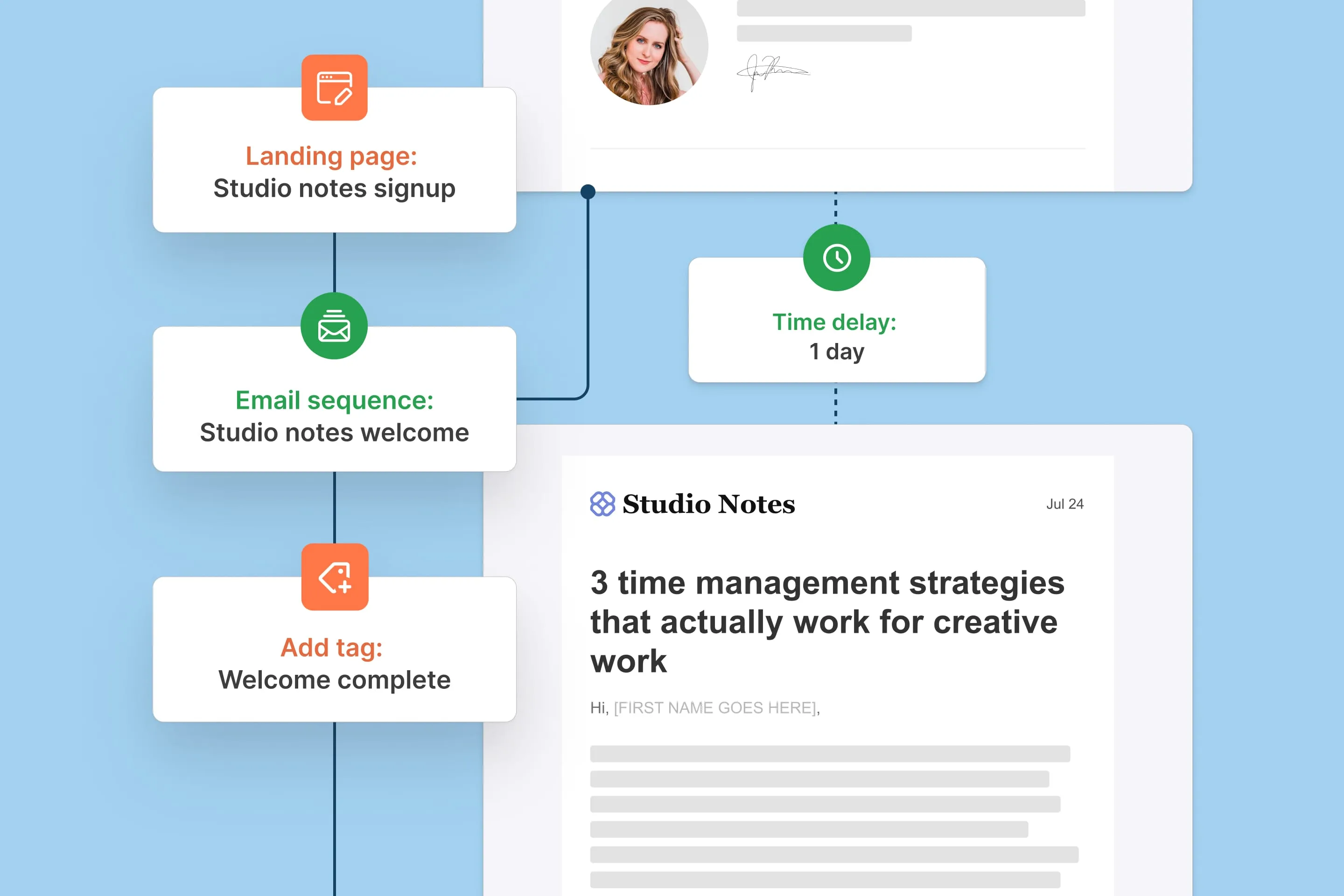
Free can confirm a signup. Creator runs a welcome series.

WHAT WE CHECKED
We checked the email Kit sends to confirm a subscription and what happens if you need timed follow-ups. Confirmation email setup · kit landing pages
WHAT WE FOUND
Kit lets you customize the confirmation message and point readers to a promised download or a page after they confirm. To send a separate welcome and follow it with timed emails, use a sequence on Creator. Kit Free limits · kit automations
LIMITATION
Kit says saved automations and sequences stay in the account if you downgrade to Free, but the sequences stop running. Kit’s downgrade terms
VERDICT
Use Free for a lead magnet and regularly scheduled issues. Pay for Creator if a new reader needs onboarding that keeps going after they confirm.
DOCUMENTED · FINDING 02

Plan fees start at $0. Selling still costs per payment.

WHAT WE CHECKED
We checked how an eligible seller charges for subscriptions and targets an issue to members. Paid newsletter setup · kit paid newsletter
WHAT WE FOUND
You can create a recurring offer on Free and filter a broadcast to active subscribers. At the published USD rate of 3.5% + 30¢, 25 payments of $10 cost $16.25 on $250 gross. Kit Commerce fees and eligibility
LIMITATION
The example excludes taxes, refunds and disputes. Check which seller terms and payment fees apply to your business. Kit Commerce terms
VERDICT
Kit Free is a good fit when you can write and schedule each paid issue yourself. At the same payment volume, Creator at $39/month brings plan and fees to $55.25.
DOCUMENTED · FINDING 03

You can control the recommendations shown after signup

WHAT WE CHECKED
We checked whether a Free newsletter is enrolled in Kit’s Creator Network and who controls the recommendations. Kit Free and the Creator Network
WHAT WE FOUND
Kit enrolls Free accounts in the network and fills five editable slots with suggestions. You can change all five or switch Recommendations off in the network settings. A paid plan is needed to earn from Paid Recommendations. Manage recommendations
LIMITATION
The effect on subscriber growth depends on the audience and the other creators Kit recommends.
VERDICT
Review the five slots before sending traffic to a signup page. Turn Recommendations off if the subscriber should go straight to your own offer.

GuidedVault Scorecard

Five equally weighted product criteria for an independent newsletter publisher. We score published capabilities and limits.
SIGNUP & LIST GROWTH
9.0
/10

Unlimited hosted pages and forms, editable recommendations and double opt-in.

WELCOME AUTOMATION
7.5
/10

A confirmation and incentive fit Free. Sequences and workflows start on Creator.

NEWSLETTER TARGETING
8.5
/10

Tags, dynamic segments and a filter for active subscribers of a paid product.

COMMERCE
8.0
/10

Recurring subscriptions on Free, with seller eligibility and a fee per payment.

VALUE FOR MONEY
8.0
/10

The Free list limit is generous. Creator brings a substantial step up in monthly cost.

OVERALL SCORE
8.2
/10
Strong
Strongest for creators publishing regular free or paid issues.

Features & integrations

Check these capabilities if Kit will replace part of your existing stack.

Tags, segments and reader preferences

Use tags to label a subscriber’s interests or purchases. Segments update by matching rules across the list. Let readers pick interests using tags on a Kit form. kit landing pages

Tags and segments · Tag checkboxes on a form

Shopify, courses and sender setup

Kit lists Shopify and course tools such as Thinkific in its App Store on Creator and Pro. Check the specific purchase or course event you need before switching. If you send from your own domain, follow Kit’s DNS verification guide.

Integrations and plan access · Verify a sending domain

Migration and opt-outs

Kit documents CSV imports, field mapping and tags. Export consent and suppression history separately, then bring over contacts who agreed to receive email. On paid plans, Kit’s migration team can help rebuild key forms and workflows.

CSV import requirements · Paid-plan migration service

Pricing & Plans

USD prices checked 19 November 2026. Paid plan pricing shown is for up to 1,000 email subscribers, billed monthly. The annual Creator plan is billed at $390 upfront. Kit plans and billing options

Free

For growing a list and sending issues yourself
$0
/ month
Up to 10,000 email subscribers
INCLUDES
  • Unlimited broadcasts
  • Unlimited hosted landing pages and forms
  • Tags and rule-based segments
  • Recurring Commerce for eligible sellers
  • Email support
KEY DIFFERENCE
Great for regularly scheduled issues, with Commerce fees if you sell.

Creator

For automated welcomes, launches and courses
$39
/ month
Entry monthly rate
INCLUDES
  • Visual automations
  • Email sequences
  • Remove Kit branding
  • App Store integrations and two team seats
  • Email and chat support
KEY DIFFERENCE
Build a separate welcome or sales sequence that runs automatically.

Pro

For advanced reporting and a larger team
$79
/ month
Regular entry rate
INCLUDES
  • Everything in Creator
  • Subscriber Signals
  • Engagement and revenue analytics
  • Newsletter referrals
  • Unlimited team seats
KEY DIFFERENCE
Useful when referral growth or revenue attribution changes your decisions.

Billing & Extras

Costs beyond the headline subscription
COMMERCE FEES
3.5% + 30¢ per USD payment
LIST SIZE
Paid plans scale by active subscribers
TRIAL
14 days, no card required per Kit
DOWNGRADE
Paid sequences stop on Free
WATCH FOR
Kit lists rates by currency and supported business locations. A paid newsletter can have a $0 plan fee and still incur costs on every successful payment. Commerce rates by currency

Switching and support. Kit lists email support on Free and email plus chat on Creator. Confirm your active-subscriber tier and billing schedule before upgrading. Plan and trial details

GUIDEDVAULT TAKE

Which plan makes sense?

Start with Free if you schedule your own issues. Creator makes sense once a welcome sequence or paid integration would save regular manual work.
  • Start with Free for hosted signup and broadcasts, up to 10,000 email subscribers.
  • An eligible seller can add a paid tier on Free and filter each broadcast to active members.
  • Choose Creator for timed welcome emails, paid integrations or removing Kit branding.
  • Try Pro if you will use subscriber analytics or referrals to make publishing decisions.
  • Export the list and check the impact on live automations before dropping to Free.

Who Kit Is Best For

The choice depends on how you welcome new readers, publish paid content and grow beyond your first list.
STRONGEST FIT

Best For

  • Solo newsletter creators who send issues on a regular schedule
  • Eligible sellers building a recurring newsletter with free and paid readers
  • Creators who need a separate signup page for each offer
LOOK ELSEWHERE IF

Not Ideal For

  • You need a separate automated welcome series at $0
  • You need native checkout in a business country Kit does not serve
  • A sales pipeline or transactional order email is central to your work
OTHER OPTIONS

Top Alternatives

MailerLite

Start a small list with a separate welcome email.

Why MailerLite?

MailerLite Free includes one hosted signup page and basic automation for up to 250 active subscribers. Comfort is the lower monthly plan for a small recurring newsletter that also needs a welcome workflow. MailerLite plans

Mailchimp

Organize occasional campaigns around existing tags.

Why Mailchimp?

Mailchimp is worth a look if your store or team already uses its audience tools. Free covers 250 contacts and 500 monthly sends, so budget for paid if you send weekly to 200. Mailchimp plans

Brevo

Follow up with sales leads and send email from one account.

Why Brevo?

Brevo pairs marketing email with a lightweight sales pipeline. It’s a better fit when you follow up with sponsors or leads individually. Check the send allowance if you publish to a growing list. Brevo plans

FREQUENTLY ASKED QUESTIONS

The limits that matter before you commit to a plan
What can you do on Kit Free?

Build hosted signup pages, use tags and segments, and send regular broadcasts to a list of up to 10,000 email subscribers. Commerce is available for eligible sellers. Kit Free guide

Does Kit Free include a welcome email?

You can customize the email that asks someone to confirm and offer a download after signup. A separate automated welcome series starts on Creator. Confirmation settings · Kit plan limits

Can I run a paid newsletter without paying for Creator?

Yes. Create a recurring subscription, then filter each paid broadcast to active members of that product. Kit charges a fee per payment. Paid newsletter setup · Eligibility and fees

Can I turn off recommendations on the Free plan?

Yes. Kit says you can edit all five Smart Recommendation slots or disable Recommendations in your Creator Network settings. Free recommendations

FINAL VERDICT

GUIDEDVAULT VERDICT

Start with Kit Free if you send each issue yourself

Start with Kit Free if you send each issue yourself. If you plan to charge for the newsletter, check your business’s Commerce eligibility before building a paid offer.
Best for creators publishing to a mix of free and paying readers.
8.2 / 10
Strong
Check the price for your list size and your business’s Commerce eligibility.