Home › Reviews › Brevo Review
EMAIL MARKETING REVIEW

Brevo Review 2026

Hands-on tested

Run your email campaigns and follow up on sales leads in the same account.
Choose Brevo when newsletter subscribers also become sales leads. Free suits a list you can reach within 300 sends a day.
8.1/10
Strong
Based on our testing & research
Free Plan Available
300 Emails / Day on Free
Check Current Offer
Affiliate-supported — We may earn a commission from qualifying links. Our reviews remain editorially independent.
Hands-on test
11 November 2026
Tested by
GuidedVault

Quick Snapshot

Best For
Small Businesses
Email campaigns and sales follow-ups
Entry Cost
Free
300 emails per day
Cost Structure
Subscription
Send volume and add-ons
Core Offering
Email & Sales CRM
Campaigns, automation and deals
Access
Web App
Browser-based
Ease of Use
Moderate
Separate setup screens

Pros, Cons & How We Tested

Pros

  • Collect confirmed signups with a shareable form and send a welcome email on Free.
  • Skip a group in a campaign without taking those contacts off your main list.
  • Track a sales deal on the same contact record you use for email.

Cons

  • The Free plan caps sends at 300 per day, even if you only send once a week.
  • The full landing-page builder starts at Standard.
  • Brevo branding appeared in the Free campaign’s footer preview.

How We Tested

On 11 November 2026, we used Brevo Free to run a double opt-in signup and welcome workflow, send one newsletter with a list exclusion, and move a deal linked to the subscriber. We used two inboxes we control. Our research process
  • Hosted signup and double opt-in
  • Welcome automation on Free
  • Campaign exclusion and click reporting
  • Contact linked to a deal after a stage change

Review Findings

HANDS-ON · FINDING 01

Signup and welcome on Free

WHAT WE CHECKED
We built a hosted signup form, enabled double confirmation and set a welcome email to send five minutes after the contact joined the list.
WHAT WE FOUND
The confirmation email arrived first. After we clicked the link, the contact appeared in the list and the separate welcome email arrived. The message kept the GuidedVault display name but showed a Brevo sending address. Brevo says it may substitute the From address when you use a free mailbox or an unauthenticated domain. Sender requirements
LIMITATION
We used one new subscriber and one list trigger. We did not test branching automations or sending from an authenticated custom domain.
VERDICT
The shareable form is enough if you just need a link that collects confirmed signups and starts a welcome email. If you want to build a full campaign page around that form, Brevo lists the landing-page builder on Standard. Signup forms · Plan guide
HANDS-ON · FINDING 02

Excluding contacts from a newsletter

WHAT WE CHECKED
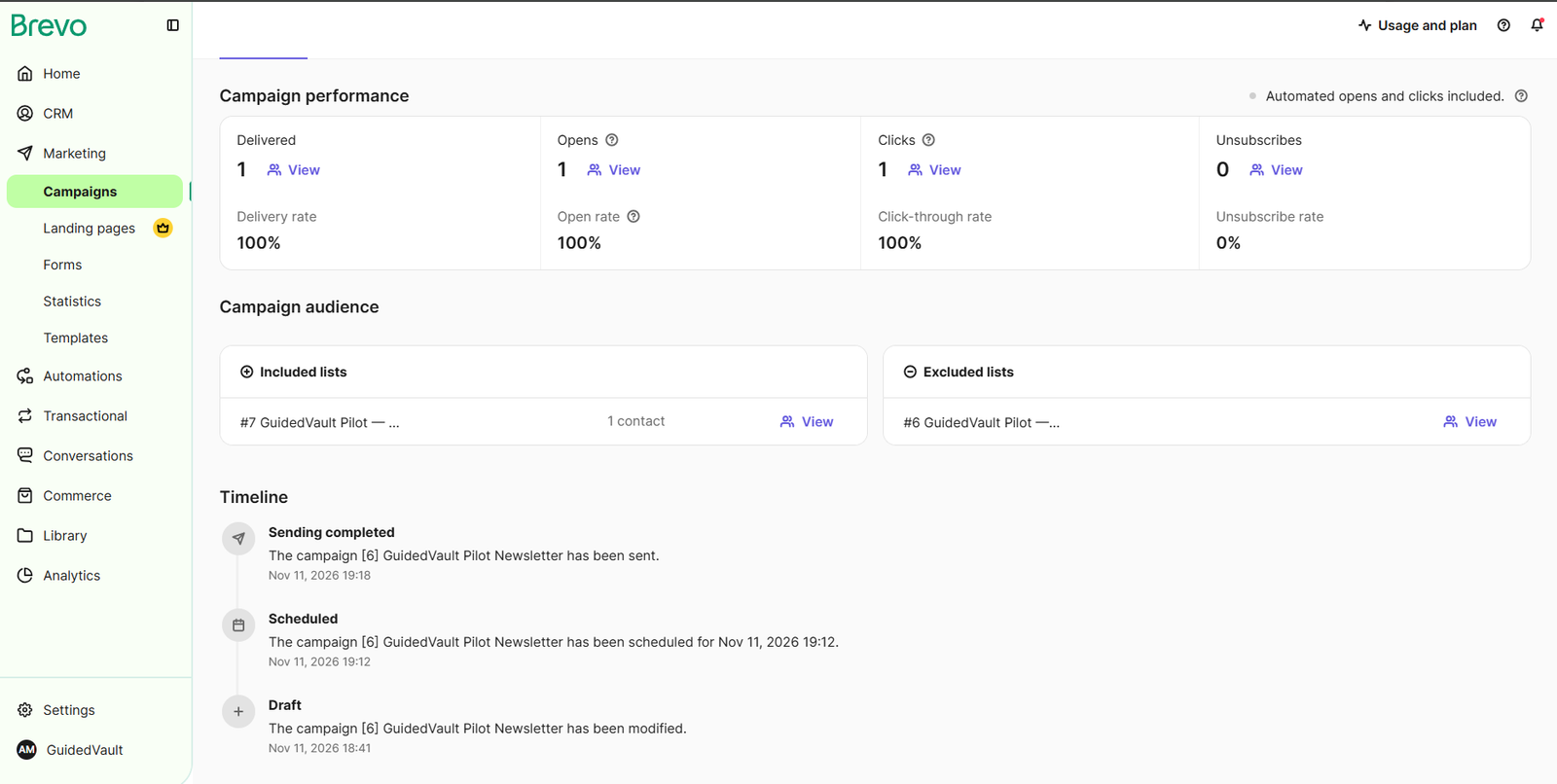
We built a newsletter in Brevo’s drag-and-drop editor with a linked button. We put two test contacts in the campaign audience and one of them in a separate exclusion list.
WHAT WE FOUND
Brevo hid the exclusion list while we also had it selected under Send to. Sending to the broader list with the separate exclusion reached the intended inbox only. The Free preview showed a Brevo footer badge.
LIMITATION
We tested a list exclusion with two controlled addresses. Use this result to check setup. Inbox placement and engagement still need evidence from a real audience.
VERDICT
If you need to email a broad audience while skipping a group, include your audience list and keep the group to skip in a separate exclusion list. Check the final count before sending. Campaign recipient setup
HANDS-ON · FINDING 03

From subscriber to sales lead

WHAT WE CHECKED
We created a pipeline, linked our existing subscriber to a test sponsorship deal, and moved it from New to Qualifying.
WHAT WE FOUND
A newsletter subscriber could stay linked to a deal as it moved through the pipeline, without creating a second contact.
LIMITATION
We tried one deal in one pipeline. We did not test sales automation, forecasting, or multi-user handoffs.
VERDICT
This is the clearest reason to choose Brevo for a small business that sells through conversations. You can keep a deal attached to the same person you already email. Brevo documents one pipeline and 50 open deals on Free. Brevo plan guide

GuidedVault Scorecard

Scores reflect the needs of a small business running email campaigns and a basic sales pipeline. The five scores are equally weighted.
EASE OF USE
7.5
/10

Guided setup helps, but forms, automations and CRM each have their own setup screens.

SIGNUP & WELCOME
8.0
/10

Confirmed signup triggered a welcome email on Free.

CAMPAIGN TARGETING
8.0
/10

Exclusions worked with overlapping lists. We verified basic reporting for one send.

SALES CRM
8.0
/10

The deal kept its linked subscriber after moving stages.

VALUE FOR MONEY
9.0
/10

Free covered all three jobs. Daily sends and one pipeline limit growth.

OVERALL SCORE
8.1
/10
Strong
Best suited to small businesses that send email and follow up on leads.

Features & integrations

Based on Brevo’s product documentation.

Segmentation

Build campaign or automation audiences that update automatically when contacts match rules based on their details or activity.

Brevo segments

Order emails, SMS and WhatsApp

Check sending limits before routing order emails through SMTP or the email API. SMS uses prepaid credits priced by destination, and Brevo lists WhatsApp campaigns on Professional with an add-on.

Transactional email · Free limits · SMS pricing · Brevo plans

Import and integrations

Map fields on CSV import and check what Brevo’s WordPress, Shopify or WooCommerce integration syncs. The WordPress plugin requires a manual first sync of existing contacts.

Contact import · Integrations · WordPress plugin

Pricing & Plans

US starting prices checked 18 November 2026 against Brevo’s plan guide. Taxes, volume tiers and add-ons affect the total. Brevo plan guide · Public pricing

Free

For small lists and a basic pipeline
$0
/ month
Free to start
INCLUDES
  • 300 emails a day
  • Basic campaign reports
  • Automation for up to 2,000 contacts
  • One pipeline and 50 open deals
  • One marketing seat
KEY DIFFERENCE
A shareable form, email automation and one sales pipeline.

Starter

For reaching larger audiences on one day
$9
/ month
Starting monthly price
INCLUDES
  • 5,000 monthly emails at the entry tier
  • 500 contacts stored at the entry tier
  • No daily sending cap
  • Remove branding with an add-on
  • Sales Essentials available separately
KEY DIFFERENCE
Removes the daily send cap. Check contact storage at your tier.

Standard

For landing pages and advanced email tools
$18
/ month
Starting monthly price
INCLUDES
  • One landing page
  • Email A/B testing
  • Advanced reporting
  • No Brevo branding
  • Unlimited automation contacts
KEY DIFFERENCE
Adds a landing page, A/B testing and advanced reports.

Billing & Extras

Costs beyond the headline plan price
SALES ESSENTIALS
$31 / month add-on
ENTERPRISE
Custom pricing
PROFESSIONAL
From $499 / month
FREE ACCESS
Ongoing, no card required
WATCH FOR
Brevo lists Free as an ongoing plan with no card required. On paid tiers, check the contact-storage allowance alongside the send allowance. Brevo says going over the storage limit can move you to a higher-priced tier automatically. At the published starting prices, Starter plus the $31/month Sales Essentials add-on comes to $40/month before tax. That’s the setup to compare if you need more pipelines or open deals. Brevo plan guide

Support and cancellation. Brevo lists email support on Free and priority email support on Standard. We didn’t open a support ticket. Brevo says paid cancellations take effect at the end of the billing period, after which you can stay on Free or choose another plan. Brevo plan and billing guide

GUIDEDVAULT TAKE

Which plan makes sense?

Start with Free if 300 daily sends and one pipeline fit. Four weekly issues to 400 subscribers use 1,600 sends, but each same-day issue exceeds Free’s daily limit. The $9/month Starter tier covers up to 500 stored contacts and 5,000 sends per month. Choose Standard if you need a landing page or email A/B testing.
  • Free — start here if 300 daily sends and one pipeline are enough.
  • Starter — consider it to remove the daily send cap.
  • Standard — choose it for a landing page, email A/B testing or advanced reports.
  • Professional — compare for high volume and advanced channels. Enterprise is custom-priced.
  • More pipelines or automated sales follow-up? Brevo lists unlimited pipelines and sales workflows with the Sales Essentials add-on on eligible paid plans.

Who Brevo Is Best For

Choose based on how often you send and how closely your email list overlaps with your sales leads.
STRONGEST FIT

Best For

  • Small teams that email contacts and track deals
  • Businesses that can send within the daily allowance
  • Teams that can work from one sales pipeline
LOOK ELSEWHERE IF

Not Ideal For

  • You need a full landing page on Free
  • You need to email more than 300 people on one day on Free
  • You need more than one pipeline at the entry price
OTHER OPTIONS

Top Alternatives

MailerLite

Build a hosted newsletter signup page.

Why MailerLite?

MailerLite’s Free plan lists one landing page, 250 active subscribers and 2,500 monthly sends. Brevo Free gives you a shareable form and sets a daily send cap. MailerLite Free limits

Mailchimp

Send occasional campaigns to one audience.

Why Mailchimp?

Mailchimp Free lists 250 contacts and 500 monthly sends. A full list of 250 can receive two campaigns a month within that allowance. Mailchimp plan guide

HubSpot

Make deal tracking and follow-up the priority.

Why HubSpot?

HubSpot’s free CRM lists two users and up to 1,000 contacts. Compare its CRM first if deals and follow-up tasks are the main job. HubSpot free CRM

FREQUENTLY ASKED QUESTIONS

What to know before you choose a plan
Can you send a newsletter with Brevo Free?

Yes. We sent a regular campaign on Free. Brevo documents up to 300 email sends per day, and unused sends do not roll over.

Does Brevo Free include a landing page?

We published a signup form with its own shareable URL on Free. Brevo lists its full landing-page builder starting on Standard.

Can you send from your own email domain?

Brevo documents sending from an authenticated domain. We didn’t test that setup. Brevo says it may replace the From address if you use a free mailbox or an unauthenticated domain. Our welcome email showed a Brevo sending address. Brevo sender requirements

Does Brevo Free include a sales pipeline?

Yes. We linked a deal to a subscriber and moved it between stages. Brevo documents one pipeline and up to 50 open deals on Free.

FINAL VERDICT

GUIDEDVAULT VERDICT

Strong for email and a small sales pipeline

Choose Brevo for email plus a sales pipeline. Compare MailerLite when you mainly need a hosted signup page and a newsletter.
Best for: small businesses that email subscribers and follow up on leads.
8.1 / 10
Strong
Check current send limits and add-on pricing before choosing a plan.